The Pass-The-Hash Toolkit contains utilities to manipulate the Windows Logon Sessions maintained by the LSA (Local Security Authority) component. These tools allow you to list the current logon sessions with its corresponding NTLM credentials (e.g.: users remotely logged in thru Remote Desktop/Terminal Services), and also change in runtime the current username, domain name, and NTLM hashes (YES, PASS-THE-HASH on Windows!).
Pass-The-Hash Toolkit
Pass-The-Hash Toolkit is comprised of three tools: IAM.EXE, WHOSTHERE.EXE and GENHASH.EXE.
GENHASH.EXE This is just a utility that uses some undocumented Windows functions to generate the LM and NT hash of a password. This tool is useful to test IAM.EXE and WHOSTHERE.EXE and perhaps to do some other things. Pretty simple and small tool.
IAM.EXE This tools allows you to change your current NTLM credentials without having the cleartext password but the hashes of the password. The program receives a username, domain name and the LM and NT hashes of the password; using this it will change in memory the NTLM credentials associated with the current windows logon session. After the program performs this operation, all outbound network connections to services that use for authentication the NTLM credentials of the currently logged on user will utilize the credentials modified by IAM.EXE.
WHOSTHERE.EXE This tools will list logon sessions with NTLM credentials (username,domain name, LM and NT hashes). Logon sessions are created by windows services that log in using specific users, remote desktop connections, etc. This tool has many uses, one that i think is interesting: Let’s say you compromised a Windows Server that is part of a Windows Domain (e.g.: Backup server) but is NOT the domain controller.
You can download Pass-The-Hash Toolkit v1.3 here:
Source Code
Latest stable release (1.3), updated on February 29, 2008.
Win32 binaries
Latest stable release (1.3), updated on February 29, 2008.
4/27/08
4/23/08
Set a password to start Windows
Windows 2000 and later operating systems use the Windows Data Protection mechanism to protect private keys and stored credentials that applications and services want to keep confidential.
Each time you boot your computer, Windows uses the Startup Key to decrypt the private keys. The Startup Key is a unique key generated for each Windows installation that encrypts and decrypts local password hashes, private keys (e.g. EFS), information stored in active directory on domain controllers and the administrator password.
Windows lets you configure a system Startup password using the Syskey utility. This password must be entered during the boot time to decrypt the system key so that Windows can access the SAM database and other private keys. A Startup password can range from 1 to 128 characters.
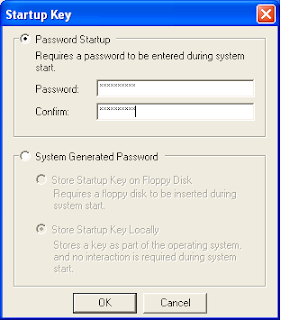
To configure a Startup Password, open the command prompt, type syskey, and then press enter. In the dialog box, click the Update button. Click Password Startup to require a password to start Windows. Enter the desired password and press OK. Microsoft recommends the password length to be at least 12 characters long.
Now, the next time you boot your computer, you will see the following screen:
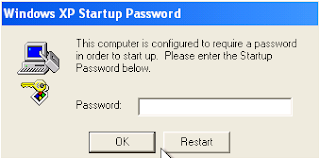 A Startup Password definitely adds an extra layer of security to your confidential information. Yet, it is possible to crack the Startup Password with physical access to your computer.
Each time you boot your computer, Windows uses the Startup Key to decrypt the private keys. The Startup Key is a unique key generated for each Windows installation that encrypts and decrypts local password hashes, private keys (e.g. EFS), information stored in active directory on domain controllers and the administrator password.
Windows lets you configure a system Startup password using the Syskey utility. This password must be entered during the boot time to decrypt the system key so that Windows can access the SAM database and other private keys. A Startup password can range from 1 to 128 characters.
To configure a Startup Password, open the command prompt, type syskey, and then press enter. In the dialog box, click the Update button. Click Password Startup to require a password to start Windows. Enter the desired password and press OK. Microsoft recommends the password length to be at least 12 characters long.

Now, the next time you boot your computer, you will see the following screen:
 A Startup Password definitely adds an extra layer of security to your confidential information. Yet, it is possible to crack the Startup Password with physical access to your computer.
Wipe data with Cipher security tool
When you delete data files, the information is not really removed from the hard disk. Instead, the space that was occupied by the deleted data is deallocated and is available for use when new data is written to the disk. Until the space is overwritten, it is possible to recover delete data with raw disk editors and various data recovery software.
The built-in Cipher command-line utility has a special option to clean deleted data on a hard disk. To overwrite delete data, use the Cipher utility with the /w switch. Use the following steps:
Click the Start button and type cmd and press ENTER.
Type cipher /w:DRIVER:\DIRECTORY and press enter. Specify the drive and the folder that contains the deleted data that you want to overwrite.
The Cipher utility permanently removes the data. The process can take a long time if you are overwriting a large space. The Cipher utility is available for Windows XP - Vista. Windows 2000 users must install the Windows 2000 Security Rollup Package 1.
The built-in Cipher command-line utility has a special option to clean deleted data on a hard disk. To overwrite delete data, use the Cipher utility with the /w switch. Use the following steps:
Click the Start button and type cmd and press ENTER.
Type cipher /w:DRIVER:\DIRECTORY and press enter. Specify the drive and the folder that contains the deleted data that you want to overwrite.
The Cipher utility permanently removes the data. The process can take a long time if you are overwriting a large space. The Cipher utility is available for Windows XP - Vista. Windows 2000 users must install the Windows 2000 Security Rollup Package 1.
EndPointScan: Online scanner for portable devices
GFI offers a free web utility - EndPointScan - to check within minutes what devices are or have been connected to computers in your network. All you need to do is to install an ActiveX control (0.7MB) on your computer. Once installed, GFI EndPointScan will then prompt you to select which computers on your network should be scanned for plugged-in devices.
Once a scan is completed, EndPointScan will display scan results in a graphical report. The report includes device usage, device threat level and computer risk level. The information presented refers to devices connected both currently and historically.
Works with Windows 2000, XP and 2003. Requires Microsoft Internet Explorer 6 or later.
Once a scan is completed, EndPointScan will display scan results in a graphical report. The report includes device usage, device threat level and computer risk level. The information presented refers to devices connected both currently and historically.
Works with Windows 2000, XP and 2003. Requires Microsoft Internet Explorer 6 or later.
VoIPong - VoIP calls sniffer
VoIPong is a free VoIP sniffer that detects all Voice-over-IP (VoIP) calls and gateways on a pipeline and produces audio files. It supports several types of VoIP protocols: SIP, H.323, Skinny Client Protocol, G711, RTP and RTCP.
A liveCD version, based on the FreeSBIE project, is also available. It has a pre-installed VoIPong release along with several boot-time scripts for configuring the OS and VoIPong.
VoIPong LiveCD
Download VoIPong
A liveCD version, based on the FreeSBIE project, is also available. It has a pre-installed VoIPong release along with several boot-time scripts for configuring the OS and VoIPong.
VoIPong LiveCD
Download VoIPong
PWDumpX: Windows encrypted password retrieveal
PWDumpX is a free open-source utility that provides system administrators the ability to retrieve the domain password cache, password hashes and LSA secrets from either local or remote Windows systems.
If you provide an input list of remote systems, PWDumpX will attempt to obtain the domain password cache, the password hashes and the LSA secrets from each remote Windows system in a multi-threaded fashion - up to 64 systems simultaneously. The retrieved information is encrypted as they are transfered over the network.
PWDumpX requires Windows NT - 2003. You can download PWDumpX here.
If you provide an input list of remote systems, PWDumpX will attempt to obtain the domain password cache, the password hashes and the LSA secrets from each remote Windows system in a multi-threaded fashion - up to 64 systems simultaneously. The retrieved information is encrypted as they are transfered over the network.
PWDumpX requires Windows NT - 2003. You can download PWDumpX here.
Orizon: Source code auditing platform
Auditing source code is rapidly becoming a standard practice employed by security teams to assure that software applications meet their security requirements. The goal of this procedure is to achieve a secure and reliable software and fix potential security holes before the software is deployed.
Orizon is a framework that provides a set of API to do automatic source code auditing. The Orizon framework utilizes both static and dynamic code analysis techniques to discover potential security holes in the source code. The static approach simply falls through the source code and searches for well-known insecure code patterns, while dynamic approach determines software behavior based on ad-hoc input data.
While still in early-stage development, Orizon can find insecure usage of routines (for example, strcpy), potential SQL-Injection and Cross-Site-Scripting vulnerabilities, and several other vulnerabilities from the OWASP Top 10 list.
The Open Web Application Security Project (OWASP) Top 10 lists the most serious web application vulnerabilities, and discusses how to protect against them. The primary aim of the project is to educate developers and software engineers about the consequences of the most common web application security vulnerabilities.
Orizon is still far from being a stable API platform for building source code auditing tools, but the developer believes the project will be the de facto platform for source code auditing tools in the short future.
Orizon is a framework that provides a set of API to do automatic source code auditing. The Orizon framework utilizes both static and dynamic code analysis techniques to discover potential security holes in the source code. The static approach simply falls through the source code and searches for well-known insecure code patterns, while dynamic approach determines software behavior based on ad-hoc input data.
While still in early-stage development, Orizon can find insecure usage of routines (for example, strcpy), potential SQL-Injection and Cross-Site-Scripting vulnerabilities, and several other vulnerabilities from the OWASP Top 10 list.
The Open Web Application Security Project (OWASP) Top 10 lists the most serious web application vulnerabilities, and discusses how to protect against them. The primary aim of the project is to educate developers and software engineers about the consequences of the most common web application security vulnerabilities.
Orizon is still far from being a stable API platform for building source code auditing tools, but the developer believes the project will be the de facto platform for source code auditing tools in the short future.
KeepPassSD: Password manager for mobile devices
KeepPassSD is a Windows Mobile port of the popular open source password manager KeepPass. Just like the desktop software, KeepPassSD securely saves passwords to various login services on your Windows-based mobile device.
For first time users, here’s how it works. KeepPassSD stores all your user-names and passwords for various login services in a single master database which is protected by either a master password or key files that you carry with you on a floppy or a USB device. Opening the master database without the proper password is nearly impossible.
There are two development branches fro KeepPass for Windows Mobile: KeepPassPPC and KeepPassSD. KeepPassPPC works on all PocketPC 2003 SE and Windows Mobile 5.0 PocketPC and Phone Edition based platforms. KeepPassSD, the would-be successor of KeePassPPC, is under heavy development and should run on PocketPC 2003 SE, Windows Mobile 5.0 PocketPC, Phone Edition and SmartPhone, Windows Mobile 6.0 standard and Pro editions.
Make sure you backup all your data before installing any of these tools.
Download KeePassSD here.
For first time users, here’s how it works. KeepPassSD stores all your user-names and passwords for various login services in a single master database which is protected by either a master password or key files that you carry with you on a floppy or a USB device. Opening the master database without the proper password is nearly impossible.
There are two development branches fro KeepPass for Windows Mobile: KeepPassPPC and KeepPassSD. KeepPassPPC works on all PocketPC 2003 SE and Windows Mobile 5.0 PocketPC and Phone Edition based platforms. KeepPassSD, the would-be successor of KeePassPPC, is under heavy development and should run on PocketPC 2003 SE, Windows Mobile 5.0 PocketPC, Phone Edition and SmartPhone, Windows Mobile 6.0 standard and Pro editions.
Make sure you backup all your data before installing any of these tools.
Download KeePassSD here.
Clear the page file to prevent data leaks
Virtual memory is a truly great mechanism. It protects programs from one another and lets them utilize more memory than actually available. In a nutshell, you can think of virtual memory as an alternate set of memory addresses.
As you run more and more programs, at some point, you’ll begin running out of physical memory. Since things can get slower when this happens, the virtual memory manager will copy as much data and possible into main memory and leave the rest on the disk (the page file). This process is known as swapping.
If you run a program that contains confidential information (passwords, encryption keys etc.), the memory chunk containing such information may be swapped out to disk. Windows deploys several types of protection mechanisms to assure no one is trying to read the page file, but what happens when you boot into a different operating system? Your confidential data is exposed to prying eyes.
To prevent potential information leaks, you can configure Windows to overwrite the page file each time it shuts down. To enable this option, open the Windows Registry editor (Run and type regedit) and navigate to:
HKEY_LOCAL_MACHINE\SYSTEM\CurrentControlSet\Control\Session Manager\Memory Management and change the value of ClearPageFileAtShutdown to 1.

As you run more and more programs, at some point, you’ll begin running out of physical memory. Since things can get slower when this happens, the virtual memory manager will copy as much data and possible into main memory and leave the rest on the disk (the page file). This process is known as swapping.
If you run a program that contains confidential information (passwords, encryption keys etc.), the memory chunk containing such information may be swapped out to disk. Windows deploys several types of protection mechanisms to assure no one is trying to read the page file, but what happens when you boot into a different operating system? Your confidential data is exposed to prying eyes.
To prevent potential information leaks, you can configure Windows to overwrite the page file each time it shuts down. To enable this option, open the Windows Registry editor (Run and type regedit) and navigate to:
HKEY_LOCAL_MACHINE\SYSTEM\CurrentControlSet\Control\Session Manager\Memory Management and change the value of ClearPageFileAtShutdown to 1.

Now, the next time you shut down your computer, the page file will be cleared. Note that it may take Windows longer to shut down.
Top 15 free SQL Injection Scanners
While the adoption of web applications for conducting online business has enabled companies to connect seamlessly with their customers, it has also exposed a number of security concerns stemming from improper coding. Vulnerabilities in web applications allow hackers to gain direct and public access to sensitive information (e.g. personal data, login credentials).
Web applications allow visitors to submit and retrieve data to/from a database over the Internet. Databases are the heart of most web applications. They hold data needed for web applications to deliver specific content to visitors and provide information to customers, suppliers etc.
SQL Injection is perhaps the most common web-application hacking technique which attempts to pass SQL commands through a web application for execution by the back-end database. The vulnerability is presented when user input is incorrectly sanitized and thereby executed.
Checking for SQL Injection vulnerabilities involves auditing your web applications and the best way to do it is by using automated SQL Injection Scanners. We’ve compiled a list of free SQL Injection Scanners we believe will be of a value to both web application developers and professional security auditors.
SQLIer - SQLIer takes a vulnerable URL and attempts to determine all the necessary information to exploit the SQL Injection vulnerability by itself, requiring no user interaction at all. Get SQLIer.
SQLbftools - SQLbftools is a collection of tools to retrieve MySQL information available using a blind SQL Injection attack. Get SQLbftools.
SQL Injection Brute-forcer - SQLibf is a tool for automatizing the work of detecting and exploiting SQL Injection vulnerabilities. SQLibf can work in Visible and Blind SQL Injection. It works by doing simple logic SQL operations to determine the exposure level of the vulnerable application. Get SQLLibf.
SQLBrute - SQLBrute is a tool for brute forcing data out of databases using blind SQL injection vulnerabilities. It supports time based and error based exploit types on Microsoft SQL Server, and error based exploit on Oracle. It is written in Python, uses multi-threading, and doesn’t require non-standard libraries. Get SQLBrute.
BobCat - BobCat is a tool to aid an auditor in taking full advantage of SQL injection vulnerabilities. It is based on AppSecInc research. It can list the linked severs, database schema, and allow the retrieval of data from any table that the current application user has access to. Get BobCat.
SQLMap - SQLMap is an automatic blind SQL injection tool, developed in python, capable to perform an active database management system fingerprint, enumerate entire remote databases and much more. The aim of SQLMap is to implement a fully functional database management system tool which takes advantages of web application programming security flaws which lead to SQL injection vulnerabilities. Get SQLMap.
Absinthe - Absinthe is a GUI-based tool that automates the process of downloading the schema and contents of a database that is vulnerable to Blind SQL Injection. Get Absinthe.
SQL Injection Pen-testing Tool - The SQL Injection Tool is a GUI-based utility designed to examine database through vulnerabilities in web-applications. Get SQL Injection Pen-testing tool.
SQID - SQL Injection digger (SQLID) is a command line program that looks for SQL injections and common errors in websites. It can perform the follwing operations: look for SQL injection in a web pages and test submit forms for possible SQL injection vulnerabilities. Get SQID.
Blind SQL Injection Perl Tool - bsqlbf is a Perl script that lets auditors retrieve information from web sites that are vulnerable to SQL Injection. Get Blind SQL Injection Perl Tool.
SQL Power Injection Injector - SQL Power Injection helps the penetration tester to inject SQL commands on a web page. It’s main strength is its capacity to automate tedious blind SQL injection with several threads. Get SQL Power Injection.
FJ-Injector Framwork - FG-Injector is a free open source framework designed to help find SQL injection vulnerabilities in web applications. It includes a proxy feature for intercepting and modifying HTTP requests, and an interface for automating SQL injection exploitation. Get FJ-Injector Framework.
SQLNinja - SQLNinja is a tool to exploit SQL Injection vulnerabilities on a web application that uses Microsoft SQL Server as its back-end database. Get SQLNinja.
Automagic SQL Injector - The Automagic SQL Injector is an automated SQL injection tool designed to help save time on penetration testing. It is only designed to work with vanilla Microsoft SQL injection holes where errors are returned. Get Automagic SQL Injector.
NGSS SQL Injector - NGSS SQL Injector exploit vulnerabilities in SQL injection on disparate database servers to gain access to stored data. It currently supports the following databases: Access, DB2, Informix, MSSQL, MySQL, Oracle, Sysbase. Get NGSS SQL Injector.
Web applications allow visitors to submit and retrieve data to/from a database over the Internet. Databases are the heart of most web applications. They hold data needed for web applications to deliver specific content to visitors and provide information to customers, suppliers etc.
SQL Injection is perhaps the most common web-application hacking technique which attempts to pass SQL commands through a web application for execution by the back-end database. The vulnerability is presented when user input is incorrectly sanitized and thereby executed.
Checking for SQL Injection vulnerabilities involves auditing your web applications and the best way to do it is by using automated SQL Injection Scanners. We’ve compiled a list of free SQL Injection Scanners we believe will be of a value to both web application developers and professional security auditors.
SQLIer - SQLIer takes a vulnerable URL and attempts to determine all the necessary information to exploit the SQL Injection vulnerability by itself, requiring no user interaction at all. Get SQLIer.
SQLbftools - SQLbftools is a collection of tools to retrieve MySQL information available using a blind SQL Injection attack. Get SQLbftools.
SQL Injection Brute-forcer - SQLibf is a tool for automatizing the work of detecting and exploiting SQL Injection vulnerabilities. SQLibf can work in Visible and Blind SQL Injection. It works by doing simple logic SQL operations to determine the exposure level of the vulnerable application. Get SQLLibf.
SQLBrute - SQLBrute is a tool for brute forcing data out of databases using blind SQL injection vulnerabilities. It supports time based and error based exploit types on Microsoft SQL Server, and error based exploit on Oracle. It is written in Python, uses multi-threading, and doesn’t require non-standard libraries. Get SQLBrute.
BobCat - BobCat is a tool to aid an auditor in taking full advantage of SQL injection vulnerabilities. It is based on AppSecInc research. It can list the linked severs, database schema, and allow the retrieval of data from any table that the current application user has access to. Get BobCat.
SQLMap - SQLMap is an automatic blind SQL injection tool, developed in python, capable to perform an active database management system fingerprint, enumerate entire remote databases and much more. The aim of SQLMap is to implement a fully functional database management system tool which takes advantages of web application programming security flaws which lead to SQL injection vulnerabilities. Get SQLMap.
Absinthe - Absinthe is a GUI-based tool that automates the process of downloading the schema and contents of a database that is vulnerable to Blind SQL Injection. Get Absinthe.
SQL Injection Pen-testing Tool - The SQL Injection Tool is a GUI-based utility designed to examine database through vulnerabilities in web-applications. Get SQL Injection Pen-testing tool.
SQID - SQL Injection digger (SQLID) is a command line program that looks for SQL injections and common errors in websites. It can perform the follwing operations: look for SQL injection in a web pages and test submit forms for possible SQL injection vulnerabilities. Get SQID.
Blind SQL Injection Perl Tool - bsqlbf is a Perl script that lets auditors retrieve information from web sites that are vulnerable to SQL Injection. Get Blind SQL Injection Perl Tool.
SQL Power Injection Injector - SQL Power Injection helps the penetration tester to inject SQL commands on a web page. It’s main strength is its capacity to automate tedious blind SQL injection with several threads. Get SQL Power Injection.
FJ-Injector Framwork - FG-Injector is a free open source framework designed to help find SQL injection vulnerabilities in web applications. It includes a proxy feature for intercepting and modifying HTTP requests, and an interface for automating SQL injection exploitation. Get FJ-Injector Framework.
SQLNinja - SQLNinja is a tool to exploit SQL Injection vulnerabilities on a web application that uses Microsoft SQL Server as its back-end database. Get SQLNinja.
Automagic SQL Injector - The Automagic SQL Injector is an automated SQL injection tool designed to help save time on penetration testing. It is only designed to work with vanilla Microsoft SQL injection holes where errors are returned. Get Automagic SQL Injector.
NGSS SQL Injector - NGSS SQL Injector exploit vulnerabilities in SQL injection on disparate database servers to gain access to stored data. It currently supports the following databases: Access, DB2, Informix, MSSQL, MySQL, Oracle, Sysbase. Get NGSS SQL Injector.
Protecting against SSH brute-force attacks
Practically all UNIX-based servers run a SSH server to allow remote administration across the Internet. From time to time, you might notice a large number of failed login attempts. Often, these are brute-force attacks against your SSH server
In this hack, we’ll show you 5 tips to protect machines running SSH daemons from brute-force attacks.
Change the default port
Configure your SSH daemon to listen on a non-standard port. SSH servers have no trouble doing this. Just make sure you configure your firewalls to allow connections to the new port. For instance, to have your SSH daemon to accept connections on port 2222, edit the sshd_config file and modify the value of Port to 2222 and restart the SSH daemon.
This method stops hackers who are just scanning for SSH servers on their default port, but any advance port scanner will reveal the daemon on a non-standard port. Nevertheless, this should reduce dramatically the number of attacks.
Disable Password Authentication
Passwords are easy to break than private-keys. Provide SSH key-based logins to all your users and disable password logins entirely. This will mean that users can only authenticate if they have the correct private key. To disable password authentication, edit sshd_config and change the value of PasswordAuthentication to no.
If you prefer passwords over SSH keys, make sure you use strong passwords for all your users.
Limit Connections
This method limits the number of SYN (connection establishment) packets. The effect of this should be unnoticed by legitimate users, but it will delay an attacker that is making repeated connections. For instance, if you want to limit the connection rate to port 2222 to three per minute:
iptables -A INPUT -p tcp –dport 2222 –syn -m limit –limit 1/m –limit-burst 3 -j ACCEPT
iptables -A INPUT -p tcp –dport 2222 –syn -j DROP
Disable Root Access
If you permit root login on your servers, you must disable it. It will still be possible to log in as a non-privileged user and become the super-user.
Deploy Anti-Brute-Force Tools
SSHDFilter -SSHDFilter blocks the frequent brute-force attacks by directly reading the SSH daemon logs and generating firewall rules to block the attack. The blocking firewall policy is defined by a list of block-rules. Download SSHDFilter.
pam_abl - A Pluggable Authentication Module that provides auto blacklisting of hosts and users responsible for repeated failed authentication attempts. Download pam_abl.
SSHBan - SSHban is simple daemon designed to ban attackers. Instead of scanning SSH logs, SSHBan directly receives data from the logger. Download SSHBan.
IPTables Recent Module - This Linux-kernel module allows you to track seen IP addresses and be able to match against them using some criteria. This module is extremely useful to build up a temporary list of IP addresses that attempt to brute-force your SSH server and drop everything coming from them for a given amount of time. Download IPTables Recent module.
DenyHost - DenyHosts is a script intended to be run by Linux system administrators to help thwart SSH server brute-force attacks . It observers login attempts to the SSH server and if it determines a possible brute-force attack, it will add the IP address to /etc/hosts.deny. Download DenyHost.
Brute-Force Detection -BFD is a shell script for parsing application logs and checking for authentication failures and block the IP address using custom firewall rules. Download Brute-Force Detection.
sshd_sentry - SSHD Sentry is a Perl script that monitors SSH server logs, detects repeated failed login attempts and adds the hosts to a black list. Download sshd_sentry.
SSHGuard - Protects networks from brute force attacks against ssh servers. It detects such attacks and blocks the host’s address with a firewall rule. Download SSHGuard.
In this hack, we’ll show you 5 tips to protect machines running SSH daemons from brute-force attacks.
Change the default port
Configure your SSH daemon to listen on a non-standard port. SSH servers have no trouble doing this. Just make sure you configure your firewalls to allow connections to the new port. For instance, to have your SSH daemon to accept connections on port 2222, edit the sshd_config file and modify the value of Port to 2222 and restart the SSH daemon.
This method stops hackers who are just scanning for SSH servers on their default port, but any advance port scanner will reveal the daemon on a non-standard port. Nevertheless, this should reduce dramatically the number of attacks.
Disable Password Authentication
Passwords are easy to break than private-keys. Provide SSH key-based logins to all your users and disable password logins entirely. This will mean that users can only authenticate if they have the correct private key. To disable password authentication, edit sshd_config and change the value of PasswordAuthentication to no.
If you prefer passwords over SSH keys, make sure you use strong passwords for all your users.
Limit Connections
This method limits the number of SYN (connection establishment) packets. The effect of this should be unnoticed by legitimate users, but it will delay an attacker that is making repeated connections. For instance, if you want to limit the connection rate to port 2222 to three per minute:
iptables -A INPUT -p tcp –dport 2222 –syn -m limit –limit 1/m –limit-burst 3 -j ACCEPT
iptables -A INPUT -p tcp –dport 2222 –syn -j DROP
Disable Root Access
If you permit root login on your servers, you must disable it. It will still be possible to log in as a non-privileged user and become the super-user.
Deploy Anti-Brute-Force Tools
SSHDFilter -SSHDFilter blocks the frequent brute-force attacks by directly reading the SSH daemon logs and generating firewall rules to block the attack. The blocking firewall policy is defined by a list of block-rules. Download SSHDFilter.
pam_abl - A Pluggable Authentication Module that provides auto blacklisting of hosts and users responsible for repeated failed authentication attempts. Download pam_abl.
SSHBan - SSHban is simple daemon designed to ban attackers. Instead of scanning SSH logs, SSHBan directly receives data from the logger. Download SSHBan.
IPTables Recent Module - This Linux-kernel module allows you to track seen IP addresses and be able to match against them using some criteria. This module is extremely useful to build up a temporary list of IP addresses that attempt to brute-force your SSH server and drop everything coming from them for a given amount of time. Download IPTables Recent module.
DenyHost - DenyHosts is a script intended to be run by Linux system administrators to help thwart SSH server brute-force attacks . It observers login attempts to the SSH server and if it determines a possible brute-force attack, it will add the IP address to /etc/hosts.deny. Download DenyHost.
Brute-Force Detection -BFD is a shell script for parsing application logs and checking for authentication failures and block the IP address using custom firewall rules. Download Brute-Force Detection.
sshd_sentry - SSHD Sentry is a Perl script that monitors SSH server logs, detects repeated failed login attempts and adds the hosts to a black list. Download sshd_sentry.
SSHGuard - Protects networks from brute force attacks against ssh servers. It detects such attacks and blocks the host’s address with a firewall rule. Download SSHGuard.
-
AIX Environment Procedures The best way to approach this portion of the checklist is to do a comprehensive physical inventory of the server...
-
 Address Resolution Protocol (ARP) provides IP-to-MAC (32-bit IP address into a 48-bit Ethernet address) resolution. ARP operates at Layer 2 ...